
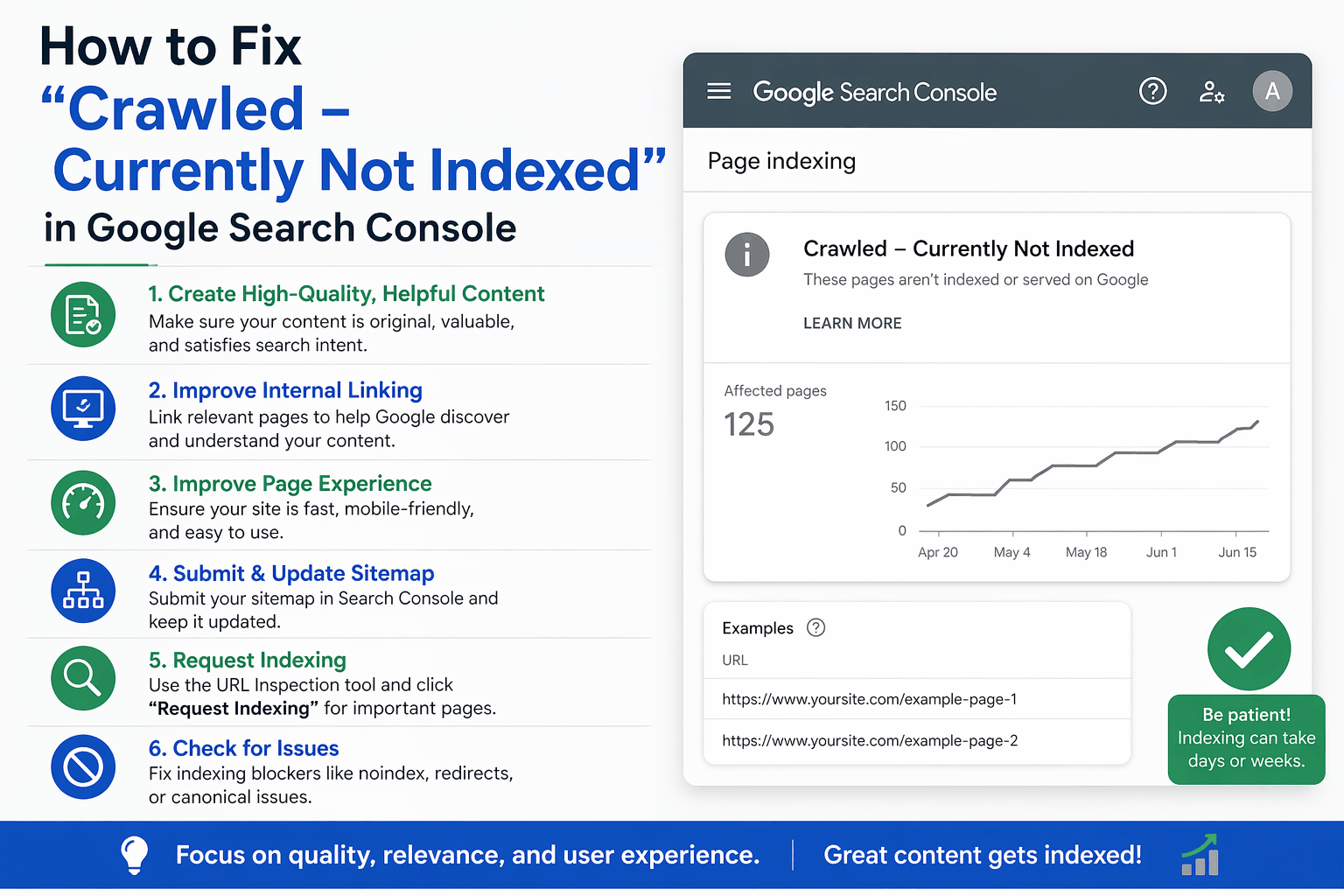
How to Fix “Crawled – Currently Not Indexed” in Google Search Console
Last Updated: April 2026 | Reading Time: 12 minutes
You’ve written amazing content. You’ve hit publish. You check Google Search Console and see those dreaded words: “Crawled – Currently Not Indexed.”
Wait, what? Google visited your page but decided not to show it in search results?
That’s exactly what’s happening. And you’re not alone—thousands of website owners see this message every single day.
The good news? This isn’t a death sentence for your content. In fact, it’s often easier to fix than you think.
Let me walk you through everything you need to know—in plain English, without the technical jargon that makes your head spin.
What Does “Crawled – Currently Not Indexed” Actually Mean?
Think of Google as a librarian with the world’s biggest library.
When Google crawls your page, it means their robots (called Googlebots) visited your page and read it. They know it exists.
But when they choose not to index it, they’re basically saying: “We saw this, but we’re not putting it on our shelves for people to find.”
Your page is stuck in limbo. It’s like being invited to a party but not being allowed inside.
Why Does This Happen?
Google doesn’t index every page they crawl. In fact, they’re getting pickier every year.
Here’s the truth: Google only wants to show the best, most helpful content in search results. If they think your page doesn’t meet their standards—or if it’s too similar to what’s already out there—they’ll skip it.
But here’s what most people don’t realize: this isn’t always about quality. Sometimes it’s technical. Sometimes it’s just timing.
The Real Reasons Google Isn’t Indexing Your Pages
Let me break down the most common reasons—and be honest with yourself about which one applies to you.
1. Your Content Is Too Thin (And Google Knows It)
If your page has only 200 words and doesn’t really help anyone, Google won’t waste space on it.
What “thin content” looks like:
- Blog posts that are just 2-3 paragraphs
- Product pages with only a title and price
- Pages that repeat what’s already on your website
- Content that doesn’t answer any real questions
The fix: Add real value. Answer questions. Go deeper. Make your content so good that people actually want to read it.
Aim for at least 600-800 words for blog posts, but quality beats word count every time. Don’t just add fluff to hit a number.
2. Your Content Is a Copy (Even If You Didn’t Mean It That Way)
Google hates duplicate content. If your page is too similar to another page—either on your own website or someone else’s—Google will pick one and ignore the rest.
Common duplicate content problems:
- Multiple pages targeting the same keyword
- Product pages with identical descriptions
- Pages with boilerplate text repeated everywhere
- Scraped or slightly rewritten content from other sites
The fix: Make every page unique. Even if you’re selling the same product in different colors, write unique descriptions. Add your own insights, examples, and personality.
3. Your Page Quality Isn’t Meeting Google’s Standards
This is the hardest pill to swallow, but sometimes your content just isn’t good enough.
Google uses something called “Quality Raters Guidelines” to determine what makes content helpful. They ask questions like:
- Does this page satisfy the user’s intent?
- Is the information accurate and trustworthy?
- Is it well-written and easy to understand?
- Does it provide expertise on the topic?
The fix: Put yourself in your reader’s shoes. Would you find this page helpful? Would you bookmark it? Would you share it with a friend?
If the answer is “maybe” or “not really,” it’s time to rewrite.
4. Technical Issues Are Blocking Google
Sometimes it’s not about content at all. Technical problems can prevent indexing even if your content is amazing.
Common technical issues:
- Your robots.txt file is blocking Google
- You accidentally added a “noindex” tag
- Your page takes forever to load
- Your website has too many redirect chains
- Your XML sitemap isn’t properly set up
The fix: Check your technical setup. Use Google’s URL Inspection Tool to see exactly what Google sees when they visit your page.
5. Your Website Is New or Has Low Authority
If your website is brand new, Google might be cautious about indexing all your pages immediately. They’re basically testing you to see if you’re legit.
The same goes if your website doesn’t have many backlinks or authority in Google’s eyes.
The fix: Be patient (yes, I know that’s annoying). Keep publishing great content. Build backlinks naturally. Promote your content on social media. Google will notice you eventually.
6. You Have Too Many Low-Quality Pages
Here’s something many people miss: if you have hundreds of low-quality pages, Google might decide your entire website isn’t worth indexing properly.
Example: E-commerce sites with thousands of out-of-stock products, blogs with hundreds of short posts, or websites with tons of tag/category pages.
The fix: Quality over quantity. Delete or noindex pages that don’t serve users. Consolidate similar content. Make your website leaner and meaner.
7. Your Internal Linking Is Weak
If a page is buried deep in your site with no internal links pointing to it, Google might crawl it but decide it’s not important enough to index.
The fix: Link to your important pages from your homepage, main navigation, or popular blog posts. Show Google what matters on your website.
Step-by-Step: How to Fix “Crawled – Currently Not Indexed”
Alright, enough theory. Let’s fix this problem.
Step 1: Find Out Which Pages Are Affected
- Log into Google Search Console
- Go to “Pages” in the left menu (under Indexing)
- Scroll down to “Why pages aren’t indexed”
- Click on “Crawled – currently not indexed”
You’ll see a list of all affected URLs. Export this list—you’re going to need it.
Step 2: Audit Each Page Honestly
Go through your list and ask yourself these tough questions for each page:
- Is this page actually helpful to someone?
- Is it different from my other pages?
- Would I be proud to show this to a friend?
- Does it answer a specific question or solve a problem?
Be brutally honest. If the answer is “no,” you have two choices: improve it or delete it.
Step 3: Improve Your Content (The Right Way)
For pages worth keeping, here’s how to make them better:
Add more depth:
- Expand short content to at least 600+ words
- Add examples, screenshots, or case studies
- Include personal insights or experiences
- Answer related questions people might have
Make it unique:
- Rewrite any duplicate sections in your own words
- Add your own perspective or angle
- Include original data, quotes, or research
Improve readability:
- Use short paragraphs (like I’m doing here)
- Add subheadings to break up text
- Use bullet points and numbered lists
- Write like you’re talking to a friend
Optimize for user intent:
- Make sure your content matches what people are actually searching for
- If people want a quick answer, give it to them upfront
- If they want a detailed guide, go deep
Step 4: Fix Technical Issues
Check these common technical problems:
Check for noindex tags:
- Use Google’s URL Inspection Tool
- Enter your URL
- Look for “Indexing allowed? No: ‘noindex’ detected”
- If found, remove the noindex tag from your page code
Check your robots.txt:
- Go to yourwebsite.com/robots.txt
- Make sure you’re not accidentally blocking important pages
- If you see “Disallow: /page-you-want-indexed,” remove that line
Improve page speed:
- Use Google PageSpeed Insights
- Fix any major issues (large images, slow server, etc.)
- Aim for a load time under 3 seconds
Fix your internal linking:
- Link to the page from your homepage or main menu
- Add contextual links from related blog posts
- Include it in your XML sitemap
Step 5: Request Indexing (The Right Way)
Once you’ve improved your page, tell Google to take another look:
- Go to URL Inspection Tool in Search Console
- Paste your improved URL
- Click “Request Indexing”
Important: Don’t spam this button. Only request indexing after you’ve actually improved the page. Google limits how many requests you can make.
Step 6: Build Some Authority
Help Google see that your page is valuable:
Get backlinks:
- Share your content on social media
- Reach out to relevant websites in your niche
- Guest post on other blogs and link back to your page
- Create content worth linking to
Improve user signals:
- Get people to actually visit your page
- Encourage comments and engagement
- Reduce bounce rate by making content engaging
- Add videos, images, or interactive elements
Step 7: Be Patient (Yes, Really)
After you’ve done everything right, you need to wait.
Google doesn’t re-crawl and re-evaluate pages instantly. It can take:
- 1-2 weeks for simple pages
- 4-6 weeks for competitive topics
- 2-3 months for new websites
Check Search Console weekly, but don’t obsess over it daily.
Special Cases: When Standard Fixes Don’t Work
Your Blog Posts Aren’t Getting Indexed
If your blog posts consistently show “Crawled – Currently Not Indexed,” you might have these issues:
Problem: Publishing too frequently without enough quality Solution: Slow down. Publish one amazing post per week instead of five mediocre ones.
Problem: Topics that are over-saturated Solution: Find unique angles. Don’t write the same “10 tips for X” that everyone else has.
Problem: Weak website authority Solution: Focus on building your domain authority through backlinks and consistent quality.
Your Product Pages Aren’t Indexed
E-commerce sites face unique challenges:
Problem: Thin product descriptions Solution: Write unique, detailed descriptions for each product. Add FAQs, reviews, and usage guides.
Problem: Out-of-stock items Solution: Use 301 redirects or noindex tags for permanently unavailable products.
Problem: Too many similar products Solution: Create category pages instead of individual pages for very similar items.
Your Category/Tag Pages Aren’t Indexed
This is actually common and sometimes okay:
Problem: These pages often have thin, duplicated content Solution: Either add unique content to make them valuable, or noindex them intentionally. Not every page needs to be indexed.
Advanced Tips From Someone Who’s Dealt With This (A Lot)
I’ve worked with websites of all sizes on indexing issues. Here’s what I’ve learned:
1. Not Every Page Needs to Be Indexed
Shocking, right? But it’s true.
Some pages are meant for users, not search engines:
- Thank you pages
- Login pages
- Internal search results
- Some tag/category pages
Pro tip: Use strategic noindex tags on pages you don’t want in search results. This can actually help Google focus on your best content.
2. Consolidate Similar Content
If you have five blog posts about basically the same topic, merge them into one comprehensive guide.
This is scary because it feels like you’re losing content. But one excellent 3,000-word guide will outperform five mediocre 500-word posts every time.
3. Update Old Content Regularly
Google loves fresh content. If you have pages that were indexed but dropped out, update them:
- Add new information
- Update statistics and dates
- Improve formatting
- Add new images or videos
Then re-submit for indexing.
4. Look at What’s Already Ranking
For your target keywords, Google the topic and see what’s ranking on page one.
Ask yourself:
- Is my content better than these?
- Am I offering something different?
- Why would Google show mine instead?
If you can’t answer that last question, you’ve found your problem.
5. Use Schema Markup
Add structured data to your pages to help Google understand your content better. This won’t directly fix indexing issues, but it helps Google see your content as valuable and well-structured.
What If Nothing Works?
Sometimes you do everything right and Google still won’t index your page.
Here’s what to do:
Option 1: Give It More Time
Seriously. I know you’ve heard this before, but Google can take months to properly evaluate new content, especially on newer websites.
Option 2: Noindex It and Move On
If a page isn’t critical to your website, just noindex it and forget about it. Focus your energy on pages that matter.
Option 3: Delete It
If content isn’t serving users or search engines, delete it. A smaller website with all high-quality pages often performs better than a large site full of mediocre content.
Option 4: Get Professional Help
If you’ve tried everything and have hundreds of pages stuck in indexing limbo, it might be time to bring in an expert. Whether you consult with an SEO freelancer in Bangalore or anywhere else, sometimes a fresh pair of eyes can spot issues you’ve missed.
Common Mistakes People Make (Don’t Be These People)
Mistake 1: Requesting Indexing Every Day
Google allows limited requests. Don’t waste them by spamming the same URL without making improvements.
Mistake 2: Panicking Too Soon
If your page was published two days ago and isn’t indexed yet, relax. This is normal.
Mistake 3: Focusing on Quantity Over Quality
Publishing 10 thin posts per week won’t help you. One excellent post per week will.
Mistake 4: Ignoring User Experience
If your website is hard to navigate, loads slowly, or looks terrible on mobile, Google will notice. Fix the user experience first.
Mistake 5: Only Caring About Google
Create content for humans first, Google second. If real people find your content valuable, Google will eventually notice.
Tools That Actually Help
Here are free tools that can help you diagnose and fix indexing issues:
Google Search Console (Obviously) Your main dashboard for seeing what Google thinks of your site.
Google URL Inspection Tool Shows exactly what Google sees when they crawl your page.
Google PageSpeed Insights Checks if slow loading might be hurting your indexing.
Screaming Frog SEO Spider (Free version) Crawls your site to find duplicate content, thin pages, and technical issues.
Copyscape or Siteliner Checks for duplicate content issues on your site.
Ahrefs or SEMrush (Paid, but worth it) Shows your website’s authority and helps you understand why Google might be hesitant to index your pages.
Real Talk: How Long Does This Take?
I’m going to be honest with you because too many SEO articles promise instant results.
For individual pages:
- Fixing the issue: 1-4 hours (depending on how much improvement needed)
- Google noticing: 1-6 weeks
- Seeing results: 2-12 weeks
For website-wide issues:
- Auditing and fixing: Several days to weeks
- Google re-evaluating your site: 2-6 months
- Full recovery: 6-12 months
SEO is a long game. Anyone promising quick fixes is lying to you.
Your Action Plan (What to Do Right Now)
Here’s your step-by-step plan to tackle this today:
Today:
- Check Google Search Console and export your list of non-indexed pages
- Identify your top 5-10 most important pages from that list
- Do a quick audit—are they thin, duplicate, or just low quality?
This Week:
- Improve your top 5 pages with better content
- Check for technical issues (noindex tags, robots.txt)
- Request indexing for improved pages
This Month:
- Continue improving the rest of your list
- Add internal links to important pages
- Create new content that’s actually valuable
- Build some backlinks to key pages
This Quarter:
- Monitor your progress in Search Console
- Delete pages that aren’t worth keeping
- Keep creating quality content
- Build your website’s overall authority
Final Thoughts
“Crawled – Currently Not Indexed” isn’t a failure—it’s feedback.
Google is telling you: “We see this, but it’s not good enough yet.”
That’s actually useful information! It means you have a clear path forward: make it better.
Focus on creating content that genuinely helps people. Write like you’re talking to a friend. Go deeper than everyone else. Be unique. Be helpful.
Do that, and Google will eventually notice.
And remember: not every page needs to rank #1. Not every page needs to be indexed. Some pages are just there to support your users, and that’s perfectly fine.
Build a website you’re proud of, and the indexing will follow.
Quick Reference: Troubleshooting Checklist
Use this checklist when a page isn’t getting indexed:
- Is the content at least 600 words and genuinely helpful?
- Is it unique (not duplicated anywhere else)?
- Does it match what people are searching for?
- Is the page loading in under 3 seconds?
- Have I checked for noindex tags?
- Is robots.txt allowing Google to crawl it?
- Are there internal links pointing to this page?
- Is it in my XML sitemap?
- Have I given Google at least 4-6 weeks to recrawl?
- Would I personally find this page useful?
If you checked all those boxes and it’s still not indexed after 2-3 months, it might be time to accept that Google doesn’t think this particular page deserves to rank—and that’s okay. Not every piece of content will be a winner.
Focus your energy on the content that does get indexed and performs well. Double down on what works.

I am Abhijeet Banerjee a dedicated SEO Specialist focused on driving organic growth and improving search visibility. I use a data-driven approach to technical SEO, content strategy, and link building to deliver measurable results and increase ROI for clients and projects